

5 Href Link Best Practices for Your Car Blog
Your website is a collection of individual pages, but what truly makes it a site? It's the connections. The simple but powerful href link is the thread that weaves your content together, creating a cohesive experience for users and a clear map for search engines. Getting this wrong can leave your best content isolated and undiscovered. A broken link frustrates visitors, while a weak internal linking structure can hide your page's authority. This guide covers the essential practices for building a strong, logical link structure that works for you, not against you.
Key Takeaways
- Connect your content strategically: Use internal links to guide visitors through your website and help search engines understand your site's structure. When linking to other websites, choose high-quality sources to build credibility and show your content is well-researched.
- Make your link text clear and descriptive: The clickable text of a link should tell users exactly what to expect. Replace generic phrases like "click here" with specific descriptions, such as "performance parts for Subaru STIs," to improve usability and SEO.
-
Use the right attributes for a better experience: For links to external sites, use
target="_blank"to open them in a new tab so visitors don't leave your page. Differentiating between relative URLs (for internal pages) and absolute URLs (for external sites) also keeps your site organized and easy to maintain.
What Is an Href Link?
If you’ve ever clicked on a piece of text that took you to another webpage, you’ve used an href link. It’s the fundamental building block of the internet, creating the “web” of interconnected pages we browse every day. The term “href” is short for “hypertext reference,” and it’s an attribute within an HTML anchor tag (<a>). Think of the anchor tag as the container for your link, and the href attribute as the instruction that tells the browser exactly where to go when someone clicks it.
Without href links, navigating the internet would be impossible. You’d have to manually type every single URL into your address bar. Imagine reading a forum post about the best Subaru WRX upgrades and not being able to simply click a link to see the parts being discussed. Href links create a seamless experience, connecting related pieces of information across a single website or the entire internet. The destination can be another webpage, an image, a PDF file, or even a specific spot on the same page. The HTML <a> tag's href attribute is what makes this powerful and intuitive navigation possible, forming the basis for how we discover and consume content online.
What Does an Href Link Look Like?
In practice, an href link is a simple line of code. Let’s say you were writing a blog post and wanted to link to our page on overlanding solutions. The HTML would look like this:
<a href="/collections/off-road-overland-crosstrek-forester-impreza-by-crawford-performance">Check out our overlanding solutions</a>
This is an example of an absolute URL, as it contains the full web address. You use absolute URLs when you’re linking to an external page on a different website.
If you were already on our website and wanted to create a link from one page to another, you could use a relative URL. For instance, linking from our homepage to our engine tuning services might look like this:
<a href="/pages/tuning-services">Learn about our tuning services</a>
This works because the browser already knows it’s on crawfordperformance.com, so you only need to provide the path to the specific page.
Default Link Appearance and Styling
Think about how you browse a website. The way links look plays a huge role in creating a smooth, intuitive experience. By default, the web has a simple system: unvisited links are blue and underlined, while links you’ve already clicked turn purple. The link you're actively clicking often flashes red. This isn't just for looks; it's a visual roadmap that helps you keep track of where you've been. This simple color-coding makes it much easier to explore a site and find exactly what you need without clicking on the same page twice.
While these defaults are helpful, you can use CSS (Cascading Style Sheets) to customize how your links look to match your site's design. You can change colors, remove the underline, or add engaging hover effects. But styling is only half the battle. The text you make clickable is just as important for usability and SEO. Instead of using a vague phrase like "click here," be specific. For example, writing "performance parts for Subaru STIs" tells your visitors exactly where they're going and what they'll find, which is far more helpful.
Here’s another pro tip: when you link to an external website, use the target="_blank" attribute in your code. This simple command tells the browser to open the link in a new tab. Why is this so useful? It lets your visitors check out the resource you're sharing without losing their place on your site. They can easily explore the other page and then click right back to your content. It's a small touch that makes a big difference in keeping people engaged with your website.
If you want to get more technical with link styling and best practices, these are two of the best resources out there:
- W3Schools, HTML Links Hyperlinks
- MDN, The Anchor element - HTML
Why Are Href Links Important for SEO?
You might see "href link" and think it’s just technical jargon, but these links are the fundamental building blocks of the internet. They are what make the web a "web," connecting pages and resources. For a website owner, understanding why they matter is key to creating a site that’s easy for both people and search engines to use.
When you build a website for your brand or business, you want visitors to find what they need easily, whether it's a specific part for their Subaru WRX or information about your engine tuning services. Href links create the pathways that guide users through your site.
Beyond user experience, these links are a primary way that search engines like Google discover and understand your content. A well-organized link structure helps search engines see which pages are most important and how they relate to one another. This process is crucial for getting your pages indexed and ranked in search results. Essentially, a smart linking strategy makes your site more visible and user-friendly.
How Internal Links Guide Users and Search Engines
Internal links are hyperlinks that connect one page on your website to another page on the same site. Think of them as the signs and hallways inside your own building. They guide visitors from a blog post about overlanding to your product page for overlanding solutions. This creates a seamless experience, helping users find relevant information without having to leave your site.
For search engines, internal links are just as important. They help search engine crawlers discover all the pages on your site and understand the relationship between them. A logical internal linking structure shows which pages are the most important, passing authority from established pages to newer ones. This helps ensure none of your valuable content becomes an "orphan page" that’s difficult for both users and search engines to find.
How External Links Build Credibility
External links are hyperlinks that point from your website to a page on a different website. While it might seem counterintuitive to send visitors away from your site, linking to high-quality, relevant sources can actually build a lot of trust. When you back up your claims by linking to authoritative sites—like an industry study or a reputable manufacturer—it shows that your content is well-researched and credible.
This practice signals to search engines that you are a trustworthy source of information. Linking to reputable domains can enhance your own site's credibility and strengthen its topical relevance. It tells Google what your page is about and that you're part of a larger conversation within your niche. Just be sure you're linking to high-quality sites, as linking to spammy or low-quality domains can have the opposite effect.
When to Use a Link vs. a Button
On the surface, links and buttons can seem interchangeable, but they have distinct jobs. The fundamental rule is simple: links are for navigation, and buttons are for actions. Think of it like driving your car. A link is like shifting into gear to travel to a new destination, such as another page on the website or a different site entirely. When you click a link to view our performance parts, you expect to be taken to that product category page. You are navigating from point A to point B, moving from one distinct location to another.
A button, on the other hand, performs an action on the current page without taking you somewhere else. It’s like honking the horn or turning on your windshield wipers—you’re interacting with your current environment. Common actions for buttons include submitting a form, opening a pop-up video, or adding an item to your shopping cart. According to web standards, you should use an anchor element (<a>) for navigation and a button element (<button>) for on-page actions. Using them correctly ensures your website is intuitive for users and accessible for people using screen readers, who rely on these distinctions to understand how to interact with a page.
Using Images and Other Elements as Links
While text links are the most common, they aren't your only option for creating clickable pathways on your site. You can turn almost any HTML element into a link, but the most effective and widely used alternative is an image. Using a high-quality photo as a link can be far more engaging than a simple line of text. Imagine seeing a dynamic shot of a Subaru Crosstrek decked out with our overlanding solutions. Clicking on that image to see the exact parts used is a much more intuitive and visually appealing experience than clicking on a text link that says "Crosstrek overlanding parts."
This technique allows you to create a more dynamic and user-friendly interface. You can build visual menus, showcase featured products, or guide visitors to important pages using compelling imagery. The key is to wrap the element you want to make clickable—whether it's an image, a heading, or a whole section—inside an anchor (<a>) tag. This simple piece of code tells the browser that the enclosed element should function as a hyperlink, directing the user to the specified URL when clicked. This opens up a lot of creative possibilities for designing your website's navigation and making it more engaging for your visitors.
Making an Image Clickable
Turning an image into a clickable link is a straightforward process that involves nesting an image tag (<img>) inside an anchor tag (<a>). The anchor tag provides the destination URL in its `href` attribute, while the image tag displays the picture. For example, if you wanted an image of a custom-tuned engine to link to our tuning services page, the code would look like this: <a href="/pages/tuning-services"><img src="engine-tune.jpg" alt="Crawford Performance engine tuning for Subaru"></a>. It's crucial to include descriptive `alt` text within the image tag. This text describes the image for users who can't see it and helps search engines understand the image's content, which is great for SEO.
Making a Button Act Like a Link
Sometimes, you might want the visual style of a button for a navigational element. However, a standard HTML <button> tag is designed for actions, not for linking to other pages, and doesn't have an `href` attribute. To make a button behave like a link, you need a bit of JavaScript. The most common method is to use the `onclick` attribute, which executes a script when the button is clicked. The code would look like this: <button onclick="document.location='/'">Go to Homepage</button>. While this works, a more modern and accessible approach is often to style an anchor (<a>) tag to look like a button. This preserves the element's semantic meaning as a link, which is better for both SEO and user experience.
5 Href Link Best Practices to Follow
Whether you’re running a build blog, managing a car club website, or sharing information on forums, how you link to other pages matters. Creating clean, effective links makes your content more professional, easier for people to use, and more visible to search engines. Think of it like building a car—every component has a purpose, and getting the details right leads to better performance. Following a few best practices for your href links ensures your website or post functions smoothly and provides a great experience for your readers. These simple habits will help you share your passion and knowledge more effectively, connecting your audience with the resources they need, from installation guides to the best performance parts on the market.
1. Choose the Correct Href Value
The first step is deciding whether to use an absolute or a relative URL in your href attribute. An absolute URL is the full web address (e.g., /) and is used when linking to an external website. A relative URL is a shortened path (e.g., /collections/wrx-upgrades) and is used for internal links between pages on your own site. Using the correct format helps search engines and users navigate your site logically. For example, if you’re writing a blog post about your build, you’d use a relative URL to link to your photo gallery page but an absolute URL to link to a manufacturer’s product page.
2. Use Essential Anchor Tag Attributes
Beyond the href itself, other attributes can improve the user experience. The most common one is target="_blank", which tells the browser to open the linked page in a new tab. This is incredibly useful when you’re linking to an external resource, like a technical document or a video. By having the link open in a new tab, your visitors can view the content without leaving your website. This simple addition keeps your audience engaged with your page while still allowing them to explore linked content you’ve recommended.
3. Get Your Href Syntax Right
Clean, correct HTML syntax is fundamental for a well-functioning website. When creating links, ensure your anchor tags are properly opened (<a href="...">) and closed (</a>). It’s also important to avoid using a hashtag (#) as a placeholder for a link that doesn't go anywhere. This can create a confusing experience for users and can cause issues with page accessibility. A website with clean code is not only more reliable for visitors but is also easier for search engines to crawl and understand, which can positively impact your visibility in search results.
4. Write Compelling Anchor Text
The clickable text of a link, known as anchor content or anchor text, should be descriptive and relevant. Avoid generic phrases like “click here” or “read more.” Instead, use text that clearly indicates what the user will find when they click. This practice benefits both users and search engines by providing valuable context. For example, instead of writing “For parts, click here,” you would write, “We installed several Subaru STI upgrades to get more power.” This approach makes your content more readable and helps search engines understand the topic of the linked page.
5. Handle Placeholder Links Correctly
You’ve probably clicked on a link that unexpectedly sent you back to the top of the page. This is often caused by a placeholder link using href="#", which is essentially a link that points to a spot on the current webpage. While developers sometimes use this as a temporary solution for elements that need to be clickable but don't have a destination, it creates a jarring experience for visitors. A much cleaner and more professional approach is to use href="javascript:void(0);" for links that trigger an action without navigating anywhere. This code explicitly tells the browser to do nothing, preventing any unwanted scrolling or page jumps. Getting these small details right ensures your website functions smoothly and provides a better experience for your audience.
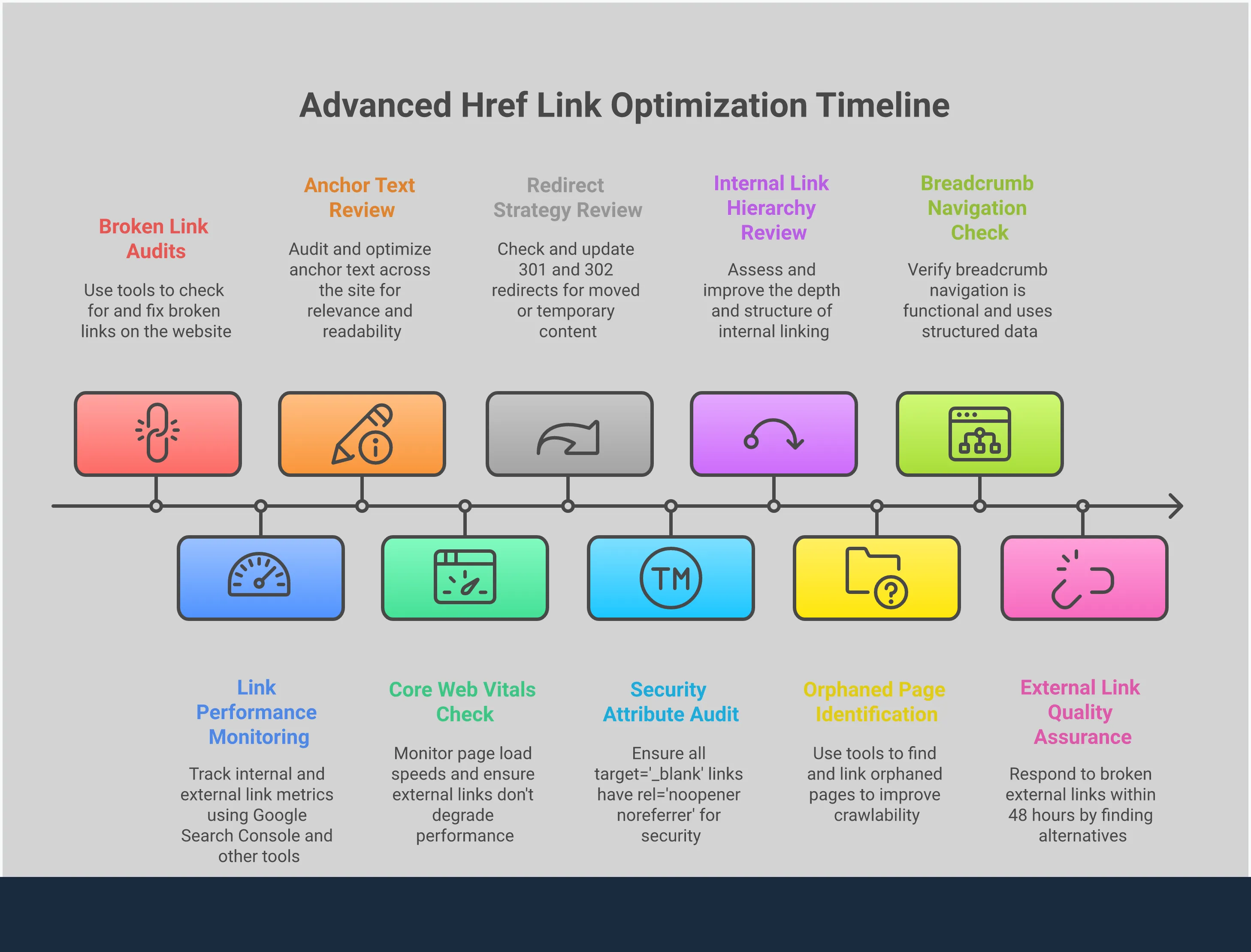
5. Audit Your Links Regularly
Over time, pages get moved or deleted, which can result in broken links on your site. Clicking a link only to land on a "404 Not Found" page is frustrating for users and can signal to search engines that your site is outdated or poorly maintained. It’s a good practice to audit your links periodically to ensure they all lead to the correct destination. You can use various online tools to scan your site for broken links and fix them. Regularly maintaining your links is a simple but crucial step in keeping your website healthy, functional, and user-friendly.
Understanding the Different Href Values
The href attribute is versatile and can hold different types of values depending on where you want the link to go. Think of it like programming a GPS: you can enter a full street address, a nearby landmark, or even just "the coffee shop down the street." Each type of value gives the browser a specific kind of instruction. Understanding these different values helps you create links that are efficient, user-friendly, and easy to manage, whether you're linking to another page on your site or an external resource. Let's break down the most common types you'll encounter.
Relative URLs for Internal Pages
A relative URL points to another page or file within the same website without writing out the full domain name. For example, if you're on crawfordperformance.com/blog and want to link to the WRX upgrades page, you could simply use href="/collections/subaru-wrx-and-subaru-wrx-sti-by-crawford-performance". This type of link is "relative" to the current domain. This approach is incredibly practical for internal linking. It makes your links shorter and much easier to manage. If you ever change your domain name, all your relative links will continue to work perfectly because they don't contain the old domain. It’s the most efficient way to build your site's internal navigation and ensure everything stays connected.
Absolute URLs for External Sites
An absolute URL is the full web address of a page, including the protocol (https://) and the domain name. For instance, href="/collections/subaru-wrx-and-subaru-wrx-sti-by-crawford-performance" is an absolute URL. You must use absolute URLs whenever you link to an external website, like a partner's page or a source you're citing in a blog post. While you can use them for internal links, it's generally not the best practice. If your domain name ever changes, you would have to go back and update every single absolute URL pointing to your own site. Using them for their intended purpose—linking out to other websites—ensures your HTML links are clear and direct the browser exactly where to go.
Anchor Links for Specific Sections
Anchor links are a special type of internal link that directs a user to a specific section of the same page they are already on. They use a hash symbol (#) followed by the ID of the element you want to jump to, like href="#contact-form". This is perfect for long-form content, such as guides or FAQs, where you want to help readers find the information they need without endless scrolling. By creating a clickable table of contents, you can significantly improve the user experience. Readers can simply click a link and be taken directly to the relevant section. This small feature makes your content more accessible and keeps visitors engaged by helping them get around your page effortlessly.
Mailto Links for Click-to-Email
A mailto link is a simple and effective way to let users send you an email directly from your website. When a user clicks on it, their default email client (like Outlook or Gmail) will open with a new message pre-addressed to you. The syntax is straightforward: href="mailto:info@crawfordperformance.com". This is a fantastic tool for contact pages or footers because it removes the friction of having to copy and paste an email address. You can even pre-fill the subject line and body text to help streamline inquiries. For any business, making it easy for customers to get in touch is key, and the mailto href attribute is a classic, reliable way to do just that.
Advanced Mailto Syntax
You can take your mailto links a step further by pre-filling the subject line and body text to streamline inquiries from customers. This is done by adding parameters to the URL. To add a subject, you append ?subject=Your%20Subject%20Here to the email address. To add body text, you use &body=Your%20message%20here. Notice the %20—this is how you represent a space in a URL. For example, if you wanted to create a link for customers to ask about engine tuning services, your code would look like this: <a href="mailto:info@crawfordperformance.com?subject=Tuning%20Inquiry&body=I'm%20interested%20in%20tuning%20for%20my%20Subaru...">Contact us about tuning</a>. This simple addition saves your customers time and helps you organize incoming requests more efficiently.
Drawbacks of Mailto Links
While mailto links are convenient, they come with a few drawbacks. The biggest issue is that they expose your email address directly in the website's HTML code. This makes it easy for automated spam bots to scrape your email and add it to junk mail lists, leading to an increase in unwanted messages. Another potential problem is user experience. These links only work if the user has a default email client (like Outlook or Apple Mail) configured on their device. If they primarily use web-based email like Gmail in their browser, clicking the link might do nothing or trigger an error. For these reasons, many websites opt for a contact form instead, which protects your email address and works for all users.
Tel Links for Click-to-Call
Similar to mailto links, tel links create a clickable phone number. The format is href="tel:+1-123-456-7890". On a smartphone, clicking this link will prompt the user to call the number directly. This is an essential feature for any business website, as a huge portion of web traffic comes from mobile devices. By turning your phone number into a tel link, you make it incredibly easy for potential customers to contact you with a single tap. It eliminates the need for them to memorize or copy the number, reducing the chance of errors and making the process of reaching out completely seamless. It’s a simple piece of code that can make a big difference in customer communication.
Common Anchor Tag Attributes You Should Know
Beyond telling a link where to go, several other attributes can fine-tune its behavior and provide extra context for users and search engines. Think of them as modifiers that give you more control over how your links function. Using them correctly can improve your site’s user experience, security, and SEO. Here are four of the most common anchor tag attributes you should know.
Prompt a File Download with `download`
When you want users to download a file directly, the download attribute is your go-to tool. This HTML5 feature tells the browser to save the resource in the href instead of navigating to it. It’s perfect for offering content like PDFs, spec sheets, or image files. You can even suggest a new filename. For example, <a href="file.pdf" download="new-file.pdf"> prompts a user to save the file with a more descriptive name. This simple addition creates a much smoother experience for any downloadable content.
Define Link Relationships with `rel`
The rel attribute defines the relationship between your page and the page you're linking to, giving context to search engines and browsers. You’ve likely seen rel="nofollow", which tells crawlers not to pass link equity to the destination. Another crucial value is rel="noopener", a security best practice used with target="_blank". It prevents the new tab from gaining malicious access to the original page's window object. Properly using the rel attribute is a key part of responsible web development and SEO.
Control Where Links Open with `target`
By default, a link opens in the same browser tab. The target attribute lets you change this. The most common value is target="_blank", which opens the linked document in a new tab. This is ideal for external links, as it sends users to a resource without navigating them away from your website. Keeping your site open encourages them to return after they're done. The default behavior, target="_self", simply loads the page in the current frame, which is standard for internal navigation.
Security and Other Target Values
While target="_blank" is great for user experience, it historically opened a security loophole. The newly opened tab could potentially access and manipulate the original page, a risk known as "tabnabbing." To prevent this, you should always pair target="_blank" with rel="noopener". This attribute severs the connection between the two tabs, keeping your site secure. While most modern browsers now automatically provide this protection, it's still a crucial best practice to include it manually for older browsers and complete peace of mind. You might also encounter other target values like _parent and _top, but these are for older sites using frames. For nearly all modern web linking, sticking with _blank for external links and the default _self for internal ones is the way to go.
Add Extra Context with the `title` Attribute
The title attribute adds extra information to a link, appearing as a tooltip when a user hovers over it. This can provide more context about where the link leads. For example, you could clarify an acronym or briefly describe a linked article. While it can enhance the user experience, it’s best to use it sparingly. The information should be supplementary, not critical, as it isn't accessible on most touch devices and isn't always read by screen readers. Keep it concise and helpful for those who can see it.
Protect User Privacy with `referrerpolicy`
Whenever someone clicks a link on your website, the site they land on can often see the URL of the page they came from—this is called "referrer information." While usually harmless, it can become a privacy issue if your page's URL contains sensitive details. The referrerpolicy attribute gives you direct control over this data exchange. It lets you define how much information is shared when a user follows a link from your site to another, helping you protect their privacy. Taking the time to understand the Referrer-Policy allows you to make conscious decisions about visitor data, which is a fundamental part of building a secure and trustworthy website that people feel comfortable using.
Making Your Href Links Accessible and User-Friendly
Creating effective links goes beyond just getting the syntax right. It’s about building a user-friendly experience that works for everyone, including people with disabilities. Just as a well-designed cockpit makes a car intuitive to operate, a well-designed website with accessible links makes information easy to find and interact with. Thinking about accessibility isn’t just a box to check; it’s a core part of creating a high-quality, professional website. When your site is easy for all users to navigate, they’re more likely to stay, explore your content, and find the information they need, whether it’s a guide on engine tuning or the right parts for their build.
Warn Users About Link Actions
Setting clear expectations is key to a good user experience. When a link does something unexpected, like opening a new tab or starting a file download, it can be disorienting. You can give users a heads-up by adding a small icon or a bit of text. For example, if you link to a PDF installation guide for a new part, you could write "(PDF)" next to the link. When you use target="_blank" to open external sites in a new tab, it's a helpful practice that keeps visitors on your page. Thankfully, modern browsers automatically add security features to protect your site from certain attacks when you open a link in a new tab, making it a safe and user-friendly option.
Implement "Skip to Main Content" Links
Imagine having to listen to the same long introduction every time you wanted to watch a video. That’s what it can feel like for people who use keyboards or screen readers to navigate websites with large menus. A "skip to main content" link is a simple but powerful accessibility feature that solves this problem. Placed at the very top of the page, this link allows users to bypass the repetitive navigation headers and jump directly to the main content. It’s an invisible convenience for most visitors but an essential tool for others, ensuring everyone can quickly access the information they’re looking for, like details on Subaru Forester upgrades, without unnecessary frustration.
Ensure Links Are Easy to Click
Have you ever tried to tap a tiny link on your phone, only to hit the one next to it by mistake? It’s a common frustration that can be easily avoided. All interactive elements, including links, should be large enough to tap accurately without needing to zoom in. The recommended minimum size for a clickable target is 44x44 pixels. This ensures that users on touch devices can easily interact with your site, whether they're browsing for performance parts for their STI in the garage or reading a build guide on the go. Making your links easy to click is a fundamental part of creating a mobile-friendly website that feels professional and considerate of its users.
How to Find and Fix Your Href Links
When we talk about the "links" in your Air Oil Separator (AOS) system, we're not talking about hyperlinks—we're referring to the network of hoses, clamps, and fittings that are the lifelines of the entire setup. A high-quality AOS is one of the most important modifications you can make to protect your WRX's engine, but it's only as effective as its connections. A single loose clamp, kinked hose, or cracked fitting can create a leak, compromising the vacuum the system needs to function. This can allow oil vapor to get right back into your intake, defeating the purpose of having an AOS in the first place.
Think of it as a chain; it's only as strong as its weakest link. That’s why regularly checking these components is a simple but critical part of your maintenance routine. It’s the best way to ensure your investment continues to safeguard your engine's performance and longevity. By staying on top of these connections, you guarantee your AOS can do its job: keeping your intake clean and your engine running strong.
Set Up Your Link Checking Tool
The first step to an optimized system is a perfect installation. Whether you’re tackling the job yourself or having a trusted shop handle it, the details are everything. All hose clamps must be properly tightened—snug enough to seal without damaging the hose. It’s also crucial to route the hoses carefully to avoid sharp bends or kinks that could restrict airflow. Pay close attention to keeping them away from high-heat sources like the turbocharger or exhaust manifold to prevent them from becoming brittle and failing prematurely. Following a detailed installation guide specific to the 2015-2021 WRX is the best way to get every connection right from the start.
Run Regular Link Health Checks
Once your AOS is installed, a quick inspection during your regular oil changes is all it takes to keep it in top shape. With the engine cool, take a few minutes to visually inspect all the hoses for any signs of cracking, swelling, or brittleness. Give the clamps a quick check to ensure they’re still tight. Look for any oil residue around the fittings, as this can be an early sign of a small leak. If your AOS model includes a drain, remember to empty it according to the manufacturer's recommendations. This simple, proactive check ensures your system remains sealed and fully effective.
Analyze Your Links' Performance Impact
A properly functioning AOS with secure links is one of the best WRX upgrades for long-term engine health. By effectively separating oil from the PCV gases, it prevents a layer of oil from coating your intake tract, intercooler, and intake valves. This directly reduces carbon buildup, a common issue that can rob your engine of power over time. More importantly, it prevents oil from lowering the effective octane of your fuel, which is critical for preventing knock or detonation in a high-performance, direct-injection turbocharged engine. This makes a well-maintained AOS a foundational mod for anyone looking to add power safely and reliably.
Related Articles
Frequently Asked Questions
What's the real difference between using a relative URL and an absolute URL for my own site's pages? Think of it this way: a relative URL is like giving directions to a room inside your own house—you'd just say "it's down the hall to the left." An absolute URL is like giving the full street address, city, and zip code. While you can use the full address to find a room in your own house, it's inefficient. Using relative URLs for your internal links is the best practice because it keeps your site's structure clean and portable. If you ever change your domain name, all your internal links will still work perfectly.
When is it actually a good idea to make a link open in a new tab? You should have a link open in a new tab whenever you're sending a visitor to an external website. By using the target="_blank" attribute, you allow your reader to check out the resource you've recommended without closing your website. This keeps them engaged with your content and makes it easy for them to return to your page once they're done, creating a much better experience for them.
Why does the text I make clickable for a link actually matter? The clickable text, or anchor text, acts as a signpost for both your visitors and search engines. Using descriptive text like "our Subaru Crosstrek upgrades" instead of a generic phrase like "click here" tells people exactly what they'll find on the other side of the link. It also gives search engines valuable context about the linked page's topic, which helps them understand your site's structure and content more effectively.
What are the consequences of having broken links on my website? Broken links create a frustrating experience for your visitors, leading them to dead-end "404 Not Found" pages. This can make your site seem outdated or poorly maintained, which can cause people to lose trust in your brand. For search engines, broken links are a signal that a site isn't being kept up to date, which can negatively affect how your pages are indexed and ranked over time.
Besides linking to other pages, what else can an href link do? The href attribute is surprisingly versatile. Beyond just linking to other web pages, you can create links that prompt a user's email client to open with a pre-filled address using mailto:. You can also create a clickable phone number with tel: that allows mobile users to call you with a single tap. These simple variations make it much easier for customers to get in touch with you directly from your website.